

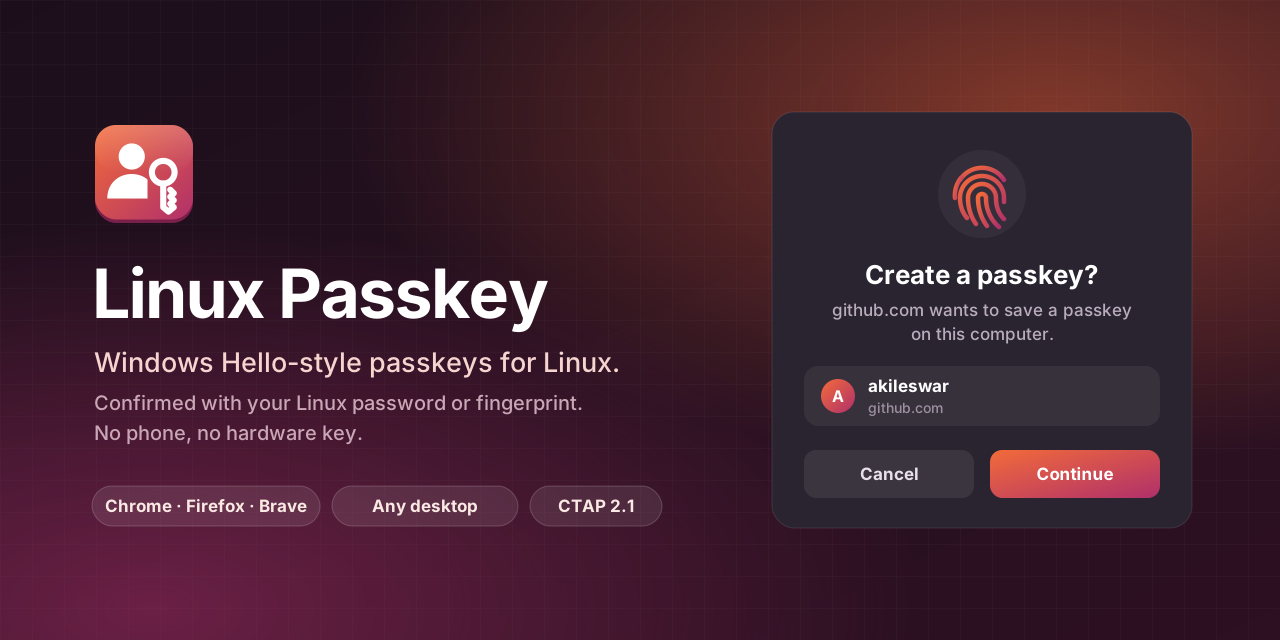
Windows Hello-style passkeys for Linux.
Create and use passkeys on any website, confirmed with your Linux password or fingerprint.
No phone, no hardware key, and no "partial passkey support" warnings.
Linux Passkey makes your computer a built-in passkey authenticator, like Windows Hello on Windows or Touch ID on a Mac. Browsers have no such feature on Linux, so a small browser extension hands passkey requests to the Linux Passkey service, which asks you to approve them and confirm with your password or fingerprint. Websites then see a computer that supports passkeys fully.
It comes in these pieces; one install brings the service and the app, and the extensions are one click each:
| Piece | What it does |
|---|---|
linux-passkey (service and app) |
The passkeyd authenticator service, the Passkeys manager app, and an approval window |
| Linux Passkey browser extension | Makes Chrome, Chromium, Brave, Edge, Vivaldi, Firefox and their relatives use the service as a built-in authenticator |
gnome-shell-extension-linux-passkey (optional) |
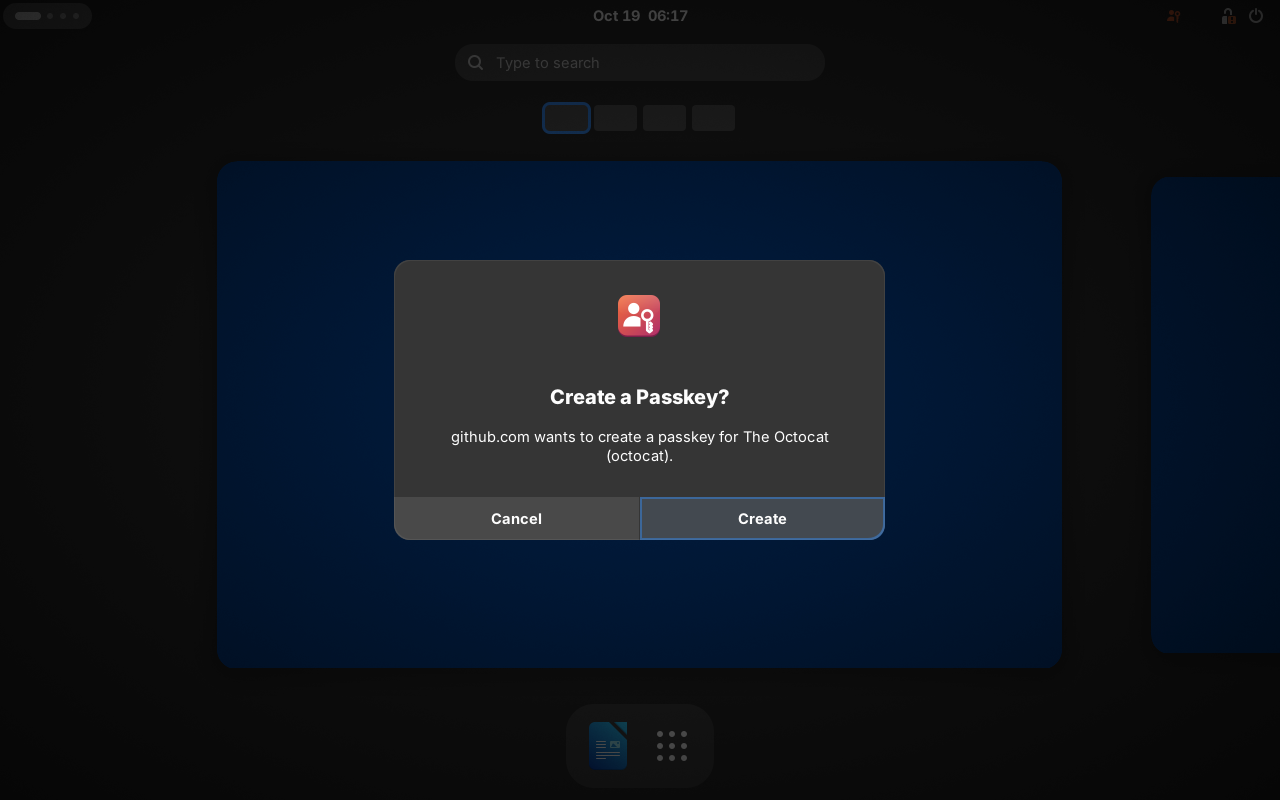
Approval prompts as GNOME Shell system dialogs, and a Passkeys menu in the top bar |
Without the GNOME extension, approval prompts open in a window of their own, so Linux Passkey works on KDE, Xfce and other desktops too.
Features
- A built-in authenticator in every major browser: through the browser extension, sites see a user-verifying platform authenticator, as on Windows and macOS. Requests meant for something else (a hardware security key, a phone, a site you have no passkey for here) go to the browser's own dialog unchanged.
- Also a USB security key (distribution packages and source installs): browsers without the extension see the computer as a plugged-in FIDO2 key.
- Passkeys and regular security-key logins: supports discoverable credentials (passkeys, username-less sign-in) and non-discoverable credentials (second factor), with no limit on how many you store.
- CTAP 2.1: built-in user verification through
pinUvAuthToken(protocols 1 and 2), credential management (so browsers' security key settings can list, rename and delete passkeys),credProtect,hmac-secret(so the WebAuthn PRF extension works), ES256 and EdDSA keys, account selection, andauthenticatorSelection. See docs/COMPLIANCE.md for the standards audit. - Identity verification uses your system login: polkit shows GNOME's own authentication dialog. It accepts your password, or your fingerprint if you have enabled fingerprint login.
- Encrypted at rest: private keys are wrapped with AES-256-GCM under a master key kept in your login keyring. The metadata file is encrypted too.
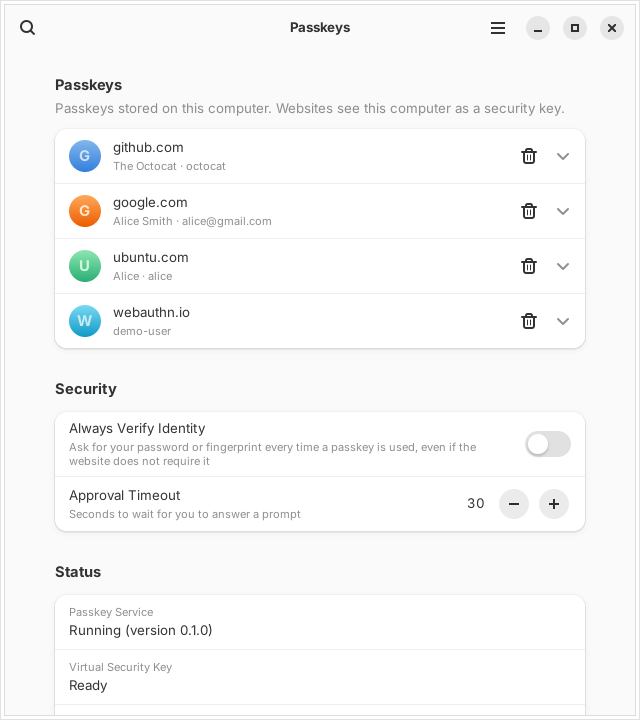
- The Passkeys app: search, inspect and delete passkeys, see the service status, require verification every time, and reset everything.
Install
Signed repositories for every major distribution family are at packages.akileswar.com/linux-passkey, so updates arrive with the system's own. Each release also has the packages to download.
Debian 13+, Ubuntu 24.04+, Mint, Pop!_OS
curl -fsSL https://packages.akileswar.com/linux-passkey/linux-passkey.gpg | sudo tee /usr/share/keyrings/linux-passkey.gpg >/dev/null
echo "deb [signed-by=/usr/share/keyrings/linux-passkey.gpg] https://packages.akileswar.com/linux-passkey/apt stable main" | sudo tee /etc/apt/sources.list.d/linux-passkey.list
sudo apt update && sudo apt install linux-passkey gnome-shell-extension-linux-passkey
Ubuntu Desktop kernels include the uhid module. Minimal and server installs (the linux-image-virtual kernel) keep it in linux-modules-extra; the package warns at install time if it is missing:
sudo apt install linux-modules-extra-$(uname -r)
Fedora 41+, RHEL 10, AlmaLinux 10, Rocky Linux 10
sudo curl -fsSL https://packages.akileswar.com/linux-passkey/rpm/fedora/linux-passkey.repo -o /etc/yum.repos.d/linux-passkey.repo
sudo dnf install linux-passkey gnome-shell-extension-linux-passkey
openSUSE Tumbleweed
sudo zypper addrepo https://packages.akileswar.com/linux-passkey/rpm/opensuse/linux-passkey.repo
sudo zypper install linux-passkey gnome-shell-extension-linux-passkey
Arch Linux, Manjaro, EndeavourOS
curl -fsSL https://packages.akileswar.com/linux-passkey/linux-passkey.asc -o /tmp/linux-passkey.asc
sudo pacman-key --add /tmp/linux-passkey.asc && sudo pacman-key --lsign-key 392A1EEB594EC9FB0300BC66A1AE3F549366D3D9
printf '\n[linux-passkey]\nServer = https://packages.akileswar.com/linux-passkey/arch\n' | sudo tee -a /etc/pacman.conf
sudo pacman -Sy linux-passkey gnome-shell-extension-linux-passkey
systemctl --user enable --now linux-passkey.service
The recipe is packaging/arch/PKGBUILD for building it yourself.
Then
Log out and back in. This lets udev give your session access to /dev/uhid and starts the service. Then turn on the GNOME extension:
gnome-extensions enable passkey@haythmkenway.github.io
From source
The dependencies, by family:
sudo apt install python3-gi python3-cryptography gir1.2-gtk-4.0 gir1.2-adw-1 gir1.2-secret-1 publicsuffix   # Debian, Ubuntu
sudo dnf install python3-gobject python3-cryptography gtk4 libadwaita libsecret publicsuffix-list           # Fedora
sudo pacman -S python-gobject python-cryptography gtk4 libadwaita libsecret publicsuffix-list               # Arch
Then:
sudo make install            # installs to /usr/local (udev/systemd/polkit files go to /usr)
sudo modprobe uhid && sudo udevadm control --reload-rules && sudo udevadm trigger
systemctl --user daemon-reload && systemctl --user enable --now linux-passkey.service
gnome-extensions enable passkey@haythmkenway.github.io   # after logging in again
make deb, make rpm and makepkg in packaging/arch build the distribution packages; tools/make-repo.sh builds the signed repositories from them, and CI does both for each release.
The browser extension
The service registers the extension's native messaging host with every browser it finds each time it starts, so the extension needs no setup beyond installing it. Until it is on the Chrome Web Store and Firefox Add-ons:
- Chrome, Chromium, Brave, Edge, Vivaldi: open
chrome://extensions(brave://extensions,edge://extensions), turn on Developer mode, choose Load unpacked and pick/usr/share/linux-passkey/browser-extension(from a source install:/usr/local/share/linux-passkey/browser-extension). - Firefox and its relatives:
make browser-extension-zipbuildsdist/linux-passkey-firefox-*.zip; load it fromabout:debugging→ This Firefox → Load Temporary Add-on.
Just the GNOME extension
make extension-zip builds dist/passkey@haythmkenway.github.io.shell-extension.zip for extensions.gnome.org or for gnome-extensions install. It needs the linux-passkey service.
Using it
- On a website, choose Create a passkey (on some sites this is under Security → Passkeys / Security keys).
- Approve the "Create a Passkey?" prompt, then confirm with your password or fingerprint.
Without the browser extension, the browser asks where to save the passkey first: choose USB security key (also shown as "security key" or "external security key").
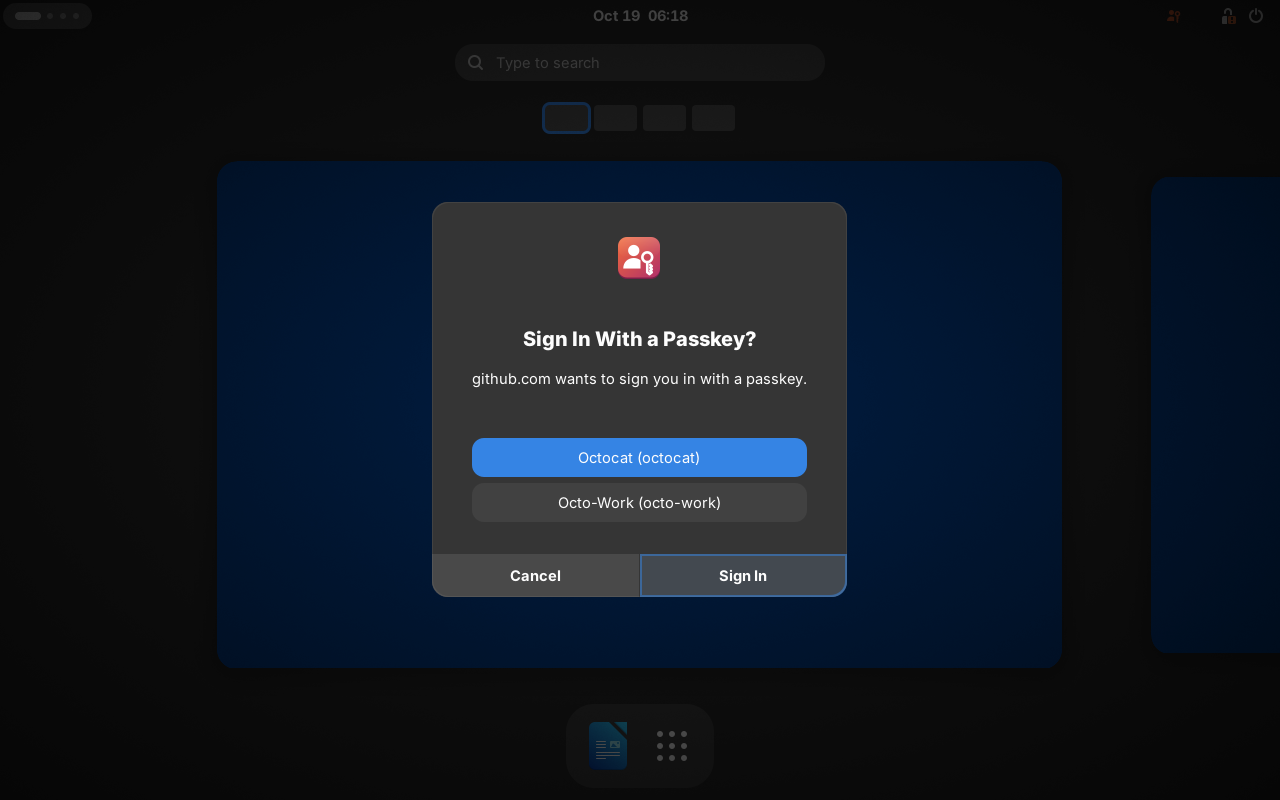
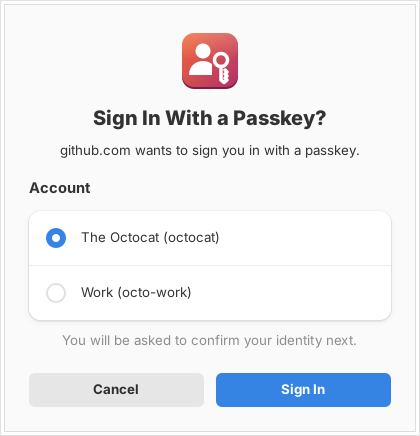
To sign in, choose Sign in with a passkey and approve the prompt. If you have several accounts on the site, pick one in the prompt.
Open Passkeys from the app grid to view or delete passkeys. Deleting a passkey revokes it straight away.
How it works
 Browser + extension ──native messaging──▶ native host ──D-Bus──┐
                                                                ▼
 Browser ──WebAuthn/CTAP2 over HID──▶ /dev/hidrawN ◀── kernel uhid ──▶ passkeyd (user service)
                                                                        │  CTAPHID framing, keepalive, cancel
                                                                        │  CTAP2 authenticator
                                                                        │  encrypted credential store ◀─ master key in login keyring
                                                                        │  polkit (pkcheck) ─▶ password / fingerprint dialog
                                                                        └─ D-Bus io.github.haythmkenway.Passkey.Daemon
                                                                               ▲                      ▲
                                                           GNOME Shell extension (prompts)    Passkeys app (management,
                                                                                              fallback prompt window)
- Browser extension: replaces
navigator.credentials.create()andget()in each page and reports a user-verifying platform authenticator. Its background script takes each request's origin from the browser's record of the sending page, never from the page itself, andpasskeydacts as the WebAuthn client: it buildsclientDataJSONfrom that origin and checks that the requested RP ID is the origin's host or a registrable suffix of it, using the Public Suffix List. A page can therefore only get signatures for its own site, as with the browser's own WebAuthn. Requests the extension leaves to the browser: security-key or phone hints, sign-ins with no passkey stored here, conditional (autofill) requests and cross-origin frames. - Transport:
passkeydcreates a virtual HID device with the FIDO usage page through/dev/uhid. systemd's60-fido-id.rulesrecognizes it as a security token and grants the logged-in user access, as it would for a hardware key. - Credentials: every credential ID is self-contained. It holds the private key encrypted with a key derived from the master key and bound to the site's RP ID hash. Discoverable credentials also have a metadata record (site, account name, user handle) in
~/.local/share/linux-passkey/credentials.enc, which is also encrypted. Discoverable credentials are only honored while their record exists, so deleting one really revokes it. - User presence is an explicit approval in the prompt. User verification is polkit action
io.github.haythmkenway.passkey.verify(auth_self, never cached). - Attestation: packed self-attestation (no vendor certificate). AAGUID
5a5b2c1e-6f3d-4b7a-9c2e-8d1f0a3b4c5d.
Files
| Path | Purpose |
|---|---|
~/.local/share/linux-passkey/credentials.enc |
Encrypted passkey metadata and signature counter |
~/.local/share/linux-passkey/key-backend |
Where the master key lives (keyring or file) |
| Login keyring item "Linux Passkey master key" | The 256-bit master key (or master.key, mode 0600, when no keyring exists) |
~/.config/linux-passkey/config.json |
Settings |
Back up your login keyring and ~/.local/share/linux-passkey together. Neither works without the other. Passkeys are not synced to other devices.
Security notes
- Passkeys are protected the same way as other secrets in your session (browser passwords, SSH keys in the keyring). Malware running as your user could talk to the session bus or read the keyring after you log in, so it could misuse them. Hardware security keys protect against that; this project does not.
- The udev rule gives the user at the local seat access to
/dev/uhid(TAG+="uaccess"). uhid can create any kind of HID device, keyboards included. That is a broader permission than this project strictly needs. - Only agents registered on the session bus (the extension or the fallback window started by the service) can answer approval prompts. Approving still needs a deliberate click, and verification goes through polkit.
Known limitations
- The browser extension is needed for the built-in experience. Without it, browsers on Linux show Linux Passkey as a USB security key, because they have no platform-authenticator API. The credentialsd project is working on one for the Linux desktop.
- Passkey autofill (conditional mediation) still goes to the browser, so passkeys stored here are not listed in the sign-in field's suggestions; use the site's Sign in with a passkey button.
- Snap-packaged browsers and the USB key. The snap
u2f-devicesinterface only exposes hidraw devices whose USB IDs are on snapd's allow-list. The virtual key reports the pid.codes test ID1209:0001by default, which may not be on that list. If a snap browser does not see the key, use the browser's.debor Flatpak build.passkeyd --usb-id VID:PIDchanges the reported ID. Getting a registered ID onto the list is planned. - U2F/CTAP1 (
CTAPHID_MSG) is not implemented. All current browsers use CTAP2. - No client PIN: user verification is always your system login (password or fingerprint).
- Passkeys are device-bound (the WebAuthn backup eligible flag is not set) and are not synced. There is deliberately no export feature, because an exportable credential would have to be reported as backup-eligible.
Troubleshooting
systemctl --user status linux-passkey.service
journalctl --user -u linux-passkey.service -f
passkeyd --verbose          # run in the foreground (stop the service first)
- "permission denied opening /dev/uhid": install the package's udev rule, then log out and back in. Check with
getfacl /dev/uhid. - "/dev/uhid not found": run
sudo modprobe uhid. If the module is missing, installlinux-modules-extra-$(uname -r)(Debian, Ubuntu) orkernel-modules-core-$(uname -r)(Fedora); if the kernel was just updated, restart. - "Your passkeys cannot be opened": the login keyring is locked or unavailable, or the passkey file cannot be decrypted. Unlock the keyring and choose Try Again. Delete All Passkeys… starts over and keeps the unreadable file aside as
credentials.enc.unreadable-<time>. - The browser doesn't see a security key: check that
ls -l /dev/hidraw*lists a device your user can access. If you use a snap browser, see the limitations above. - No verification dialog appears: a polkit authentication agent must be running. GNOME Shell provides one.
Development
make check        # unit, CTAPHID, D-Bus, fuzz and end-to-end WebAuthn tests (python-fido2 client + server)
make lint         # pyflakes, ESLint, desktop-file, AppStream and polkit validation
make pot          # regenerate po/linux-passkey.pot for translators
make deb          # build the Debian packages into ../
Translations
Translations live in po/. To add a language, run msginit -i po/linux-passkey.pot -o po/<lang>.po -l <lang>, translate it, and add the language code to po/LINGUAS. The same catalog serves the app and the GNOME extension.
The end-to-end tests drive the authenticator with python-fido2's WebAuthn client and verify the results with its server implementation. That covers registration, sign-in, PRF/hmac-secret, exclude lists, cancellation, deletion and reset.
D-Bus API
Bus name io.github.haythmkenway.Passkey.Daemon, object /io/github/haythmkenway/Passkey/Daemon, interface io.github.haythmkenway.Passkey1:
| Member | Description |
|---|---|
RegisterAgent(), UnregisterAgent() |
Become or stop being an approval-prompt agent |
Respond(u id, b approved, i choice) |
Answer a prompt (registered agents only) |
GetPendingRequests() → a(usssasb) |
Prompts waiting for an answer |
ListCredentials() → aa{sv}, DeleteCredential(s id) → b |
Manage passkeys |
ResetAll() → b |
Delete everything (requires verification) |
Retry() |
Try to open the passkey storage again (after unlocking the keyring) |
WebAuthnCreate(s origin, s top_origin, s options, s handle) → s, WebAuthnGet(…) → s |
navigator.credentials.create() / get() with WebAuthn JSON options and results; errors are io.github.haythmkenway.Passkey.WebAuthn.<DOMException name> |
WebAuthnHasCredentials(s origin, s options) → b, WebAuthnCancel(s handle) |
Whether a sign-in could use a passkey stored here; cancel a ceremony this caller started |
GetStatus() → a{sv}, GetSettings() → a{sv}, SetSetting(s, v) |
Status (state is starting, ready or error) and settings. Only always_verify and approval_timeout can be set over D-Bus |
signal ApprovalRequested(u id, s operation, s rp_id, s rp_name, as accounts, b verify) |
A prompt should be shown |
signal ApprovalClosed(u id) |
A prompt was answered, cancelled or timed out |
signals CredentialsChanged, StatusChanged |
Refresh hints |
Contributing
Bug reports, test results from your distribution and browser, translations and code are all welcome.
- Report a problem: open an issue with your distribution, desktop, browser, how you installed Linux Passkey, and the output of
journalctl --user -u linux-passkey -b | tail -50. - Send a change: fork the repository, make your change on a branch, run
make checkandmake lint, and open a pull request. Add a test for every fix; CI runs the suite on Ubuntu 22.04 and 24.04 and builds the packages. - Translate: see Translations.
- Security issues: please report them privately through GitHub's security advisories rather than in a public issue.
Support the project
Linux Passkey is free and open source, made in spare time. If it helps you, a donation keeps it going.
| PayPal | paypal.me/0x4kil |
| UPI | akileswar2002@oksbi |
| Bitcoin | 13pu8fvcNt6Rx8tXJGfFDVWf59uhZuaFEp |


License
GPL-3.0-or-later. See LICENSE.